Notes your way, AI optional
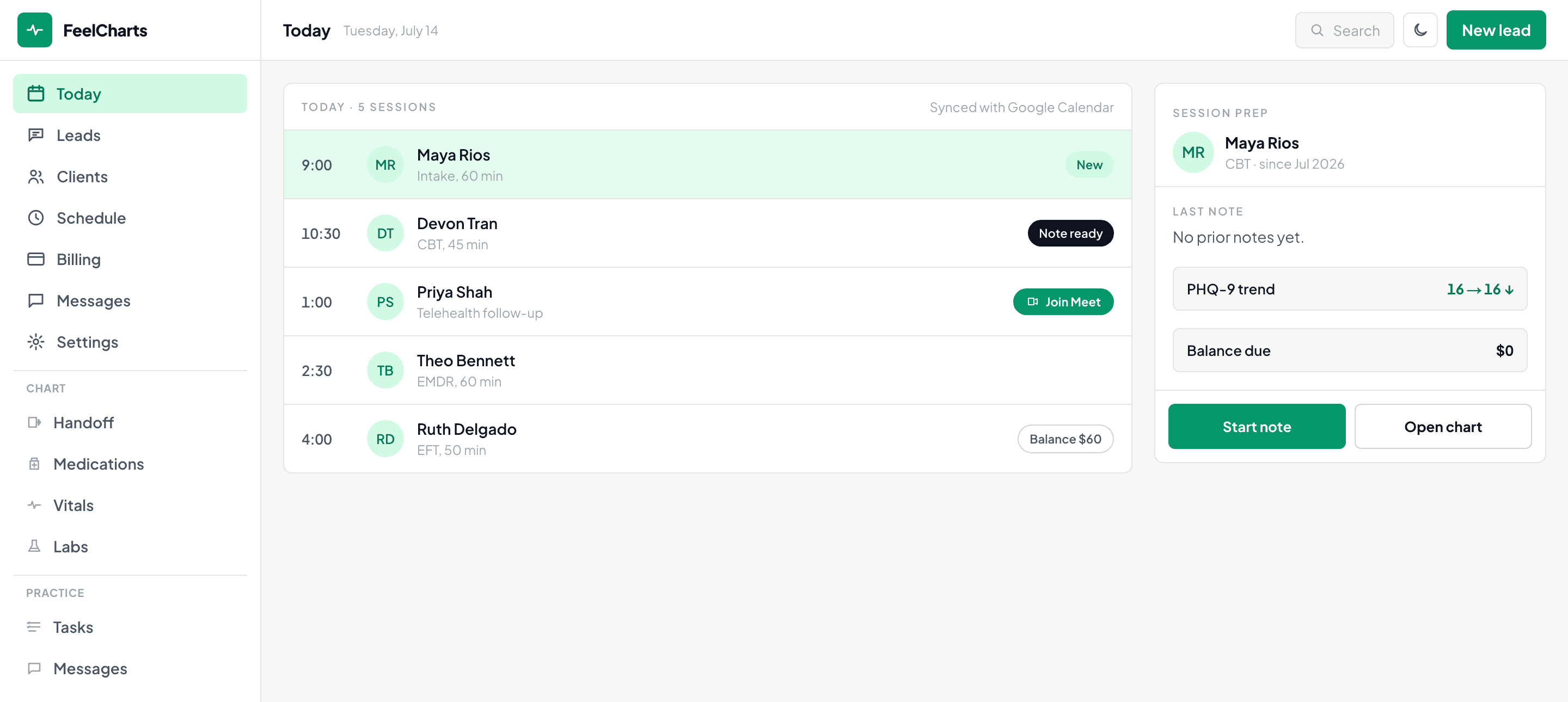
Type it, dictate it on your own device, or let AI draft it from the session, in SOAP, DAP, or BIRP. You choose for every note, and nothing is recorded unless you pick the AI draft.
NotesThe EHR, CRM, and front desk for direct-pay mental health. Intake, scheduling, notes, payments, and telehealth in one system, with no claims and no clearinghouse. AI handles the admin, and it never touches a note unless you ask it to.
$39 per clinician a month. $123 with prescribing.
Every chart that bills insurance inherits the machinery that comes with it: claims, clearinghouses, eligibility checks, denials, appeals, and the price tag that pays for all of it. That machinery is why an EHR costs fifty dollars and takes a week to learn.
Take it out and what is left is the part clinicians actually touch. That is a different product for a different clinician, the one who went direct pay on purpose and is not coming back.
If you bill insurance, we are genuinely the wrong tool and we will tell you so.
Four things instead of ten, in one subscription.
A scribe, a CRM, a scheduler, and a payment tool, replaced by a chart that already knows the client.
Type it, dictate it on your own device, or let AI draft it from the session, in SOAP, DAP, or BIRP. You choose for every note, and nothing is recorded unless you pick the AI draft.
NotesInquiry to intake to discharge and back, with waitlist, history, and messages for every client in one view.
ClientsConservative CPT and ICD-10 suggestions you confirm, never auto-billed. Built to survive a payer audit.
CodingCard on file, packages, and one-click superbills. Cash-pay first, so the money lands without a clearinghouse.
PaymentsPHQ-9, GAD-7, and PCL-5 sent, collected, and scored the moment they come back.
ScreenersClient self-booking with Google Appointments, synced to your Google Calendar, with reminders that cut no-shows.
ScheduleTalk to clients and share documents inside the chart, on an encrypted channel, instead of over personal email or text.
MessagingStart a Google Meet from the chart in one tap. It lands on your Google Calendar with the client invited. No separate tool, no add-on fee.
TelehealthConnect drChrono and your whole charts come across. IntakeQ and Healthie bring your client list. Keep working in your old system while it moves.
MigrateThis is the software half. If you would rather a person ran it for you, that is FeelOrganized, the practice admins who work inside it.
 FeelConnected · The client appComing soon
Every client of your practice gets the app, free. What you assign goes to their phone. What they choose to share comes back to the chart before the next session.
FeelConnectedTry it. Nothing you type here is saved.
No after-hours charting and no chasing the payment. Write the note the way you work, with or without AI, and the visit closes coded and paid while your client is still in the room.
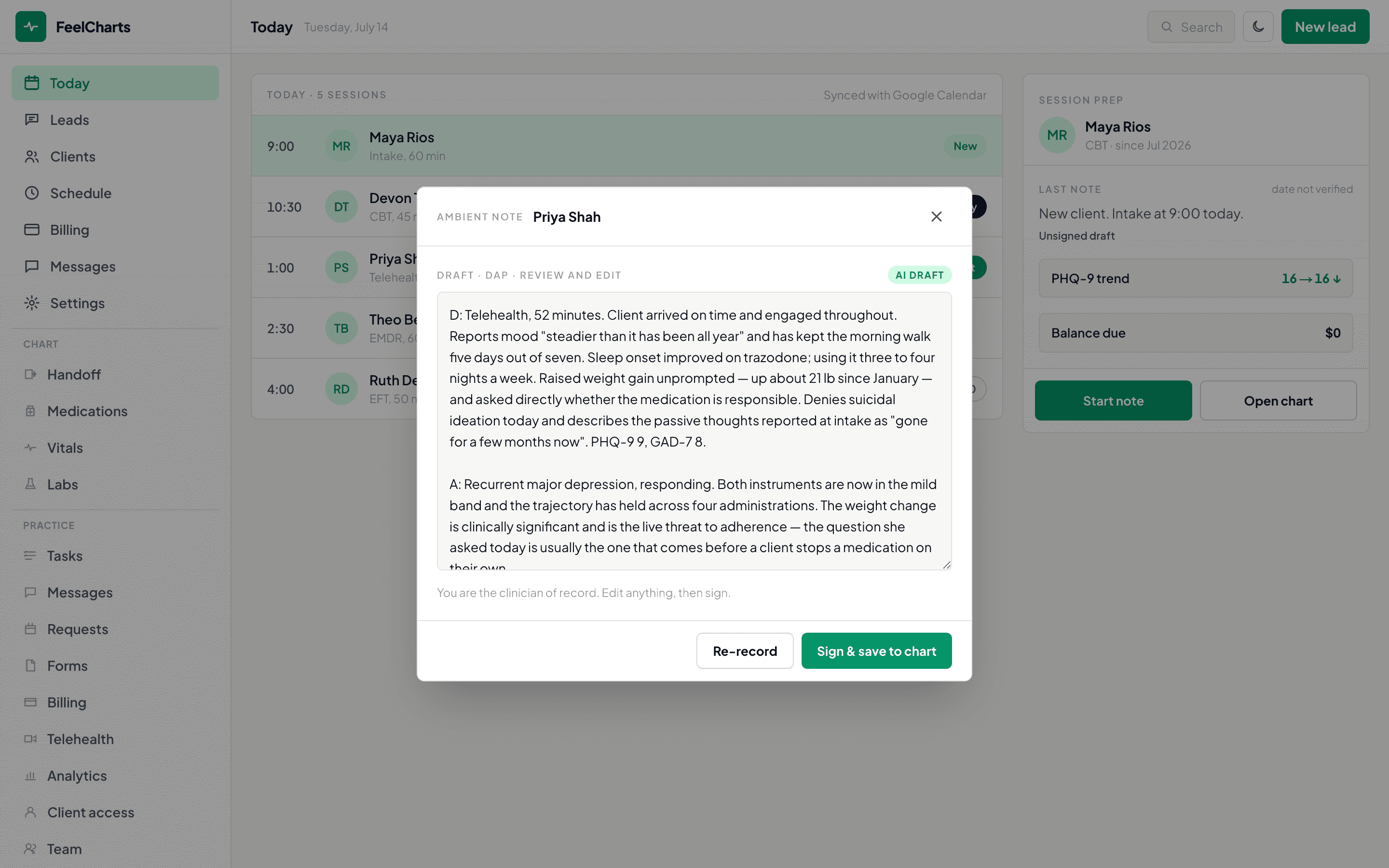
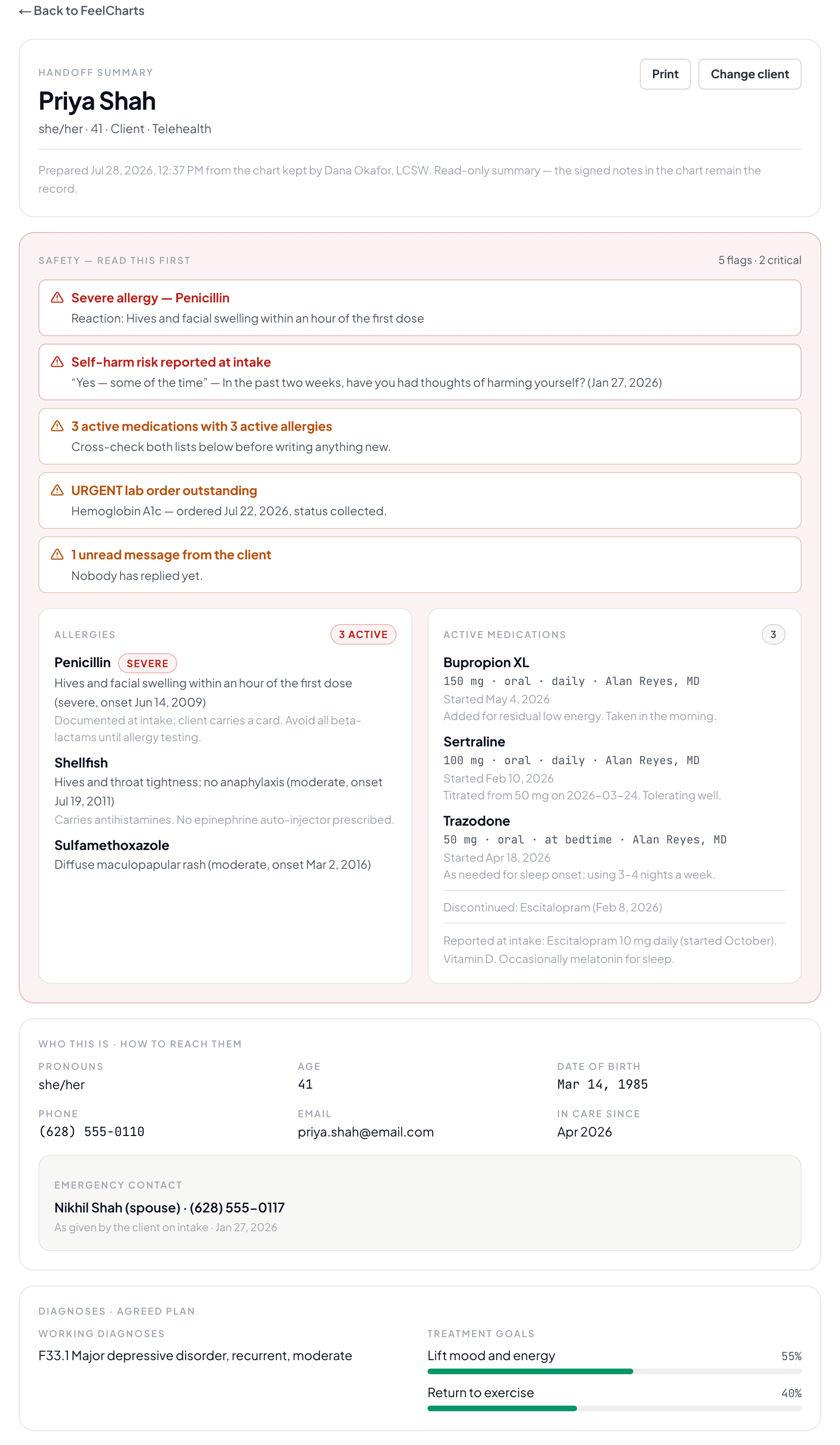
The first is the medical-legal record. The second is the week you are not there: a hospital stay, a leave, a covering clinician picking up your Tuesday. Someone has to open this chart cold and know, inside a minute, what could hurt this person.
So the chart keeps that page written. It reads the whole record and puts the dangerous parts first: a severe allergy, a self-harm answer on an intake, a medication list that collides with the allergy list, a lab that never came back, a message nobody replied to. The full lists sit underneath, with doses, prescribers, and start dates.
The alternative is asking a covering clinician to find all of that by reading the last six notes.
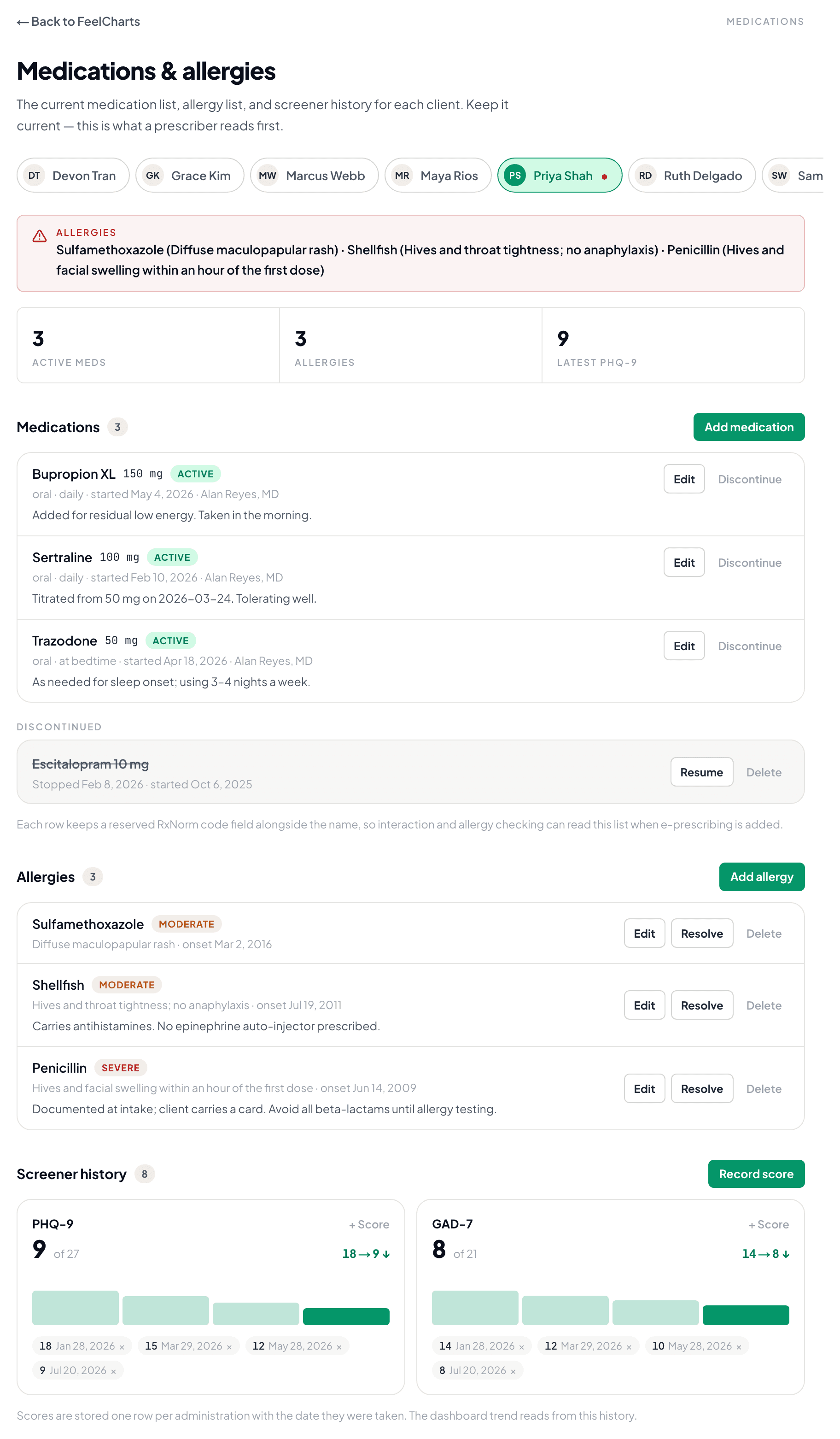
Prescribing changes what a chart has to carry. The medication list, the allergy list, and the numbers that move when a dose changes sit on the same record as the notes, so nothing has to be looked up twice or kept somewhere else.
The prescriber chooses the medication. The patient chooses the pharmacy.
The patient can pick any pharmacy, retail or mail order, and change it at any time. Controlled substances need a one-time identity proofing step and two-factor authentication every time one is signed. How prescribing works
Every active medication with dose, route, prescriber, and start date, the allergy list beside it, and what was discontinued still on the page. Each row carries a coded drug field under the name, which is what interaction and allergy checking read from.
Blood pressure, heart rate, weight, BMI, temperature, and respiratory rate, each with the change since the last reading and a trend running back to the first one on file. When a client asks whether the medication is why the weight moved, the answer is already on screen.
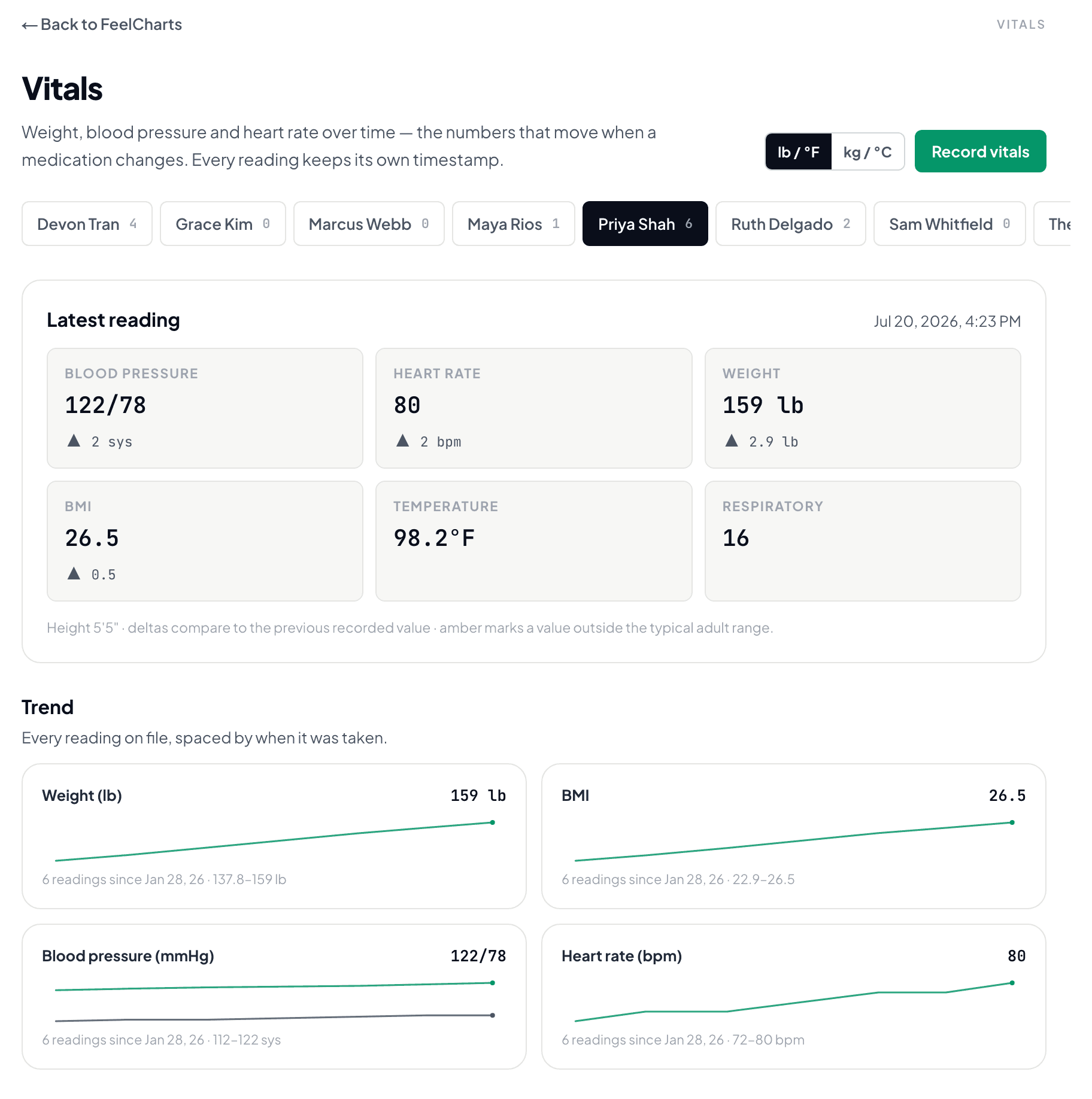
Prescribing is the $123 plan. Everything else is the same product at the same price as charting alone.
Records still move on fax. Get a dedicated number for the practice in seconds, send from any chart, and file what comes back into the right client. Already have a fax service you like? Keep it. Nothing else in FeelCharts depends on this.
$15 per line, per month
100 pages included, then 15¢ a page, sent or received.
New numbers only. We do not port existing numbers.
You are the covered entity, and your license is on the line. So FeelCharts is engineered to the HIPAA Security Rule’s technical safeguards. The list that follows is not a policy document, it is how the software is actually built.
No clinician should have to take a vendor’s word for this. Ask us what happens to a session recording, who can read a note, or where a client record lives, and you will get a straight, specific answer.
And it is your data. Export the whole practice in one click, any time, and take it wherever you go. What stays with us is the plumbing, never your records.
Every practice signs our Business Associate Agreement in FeelCharts before any client records go in.
Every client record and note is scoped to your account by a row-level policy in Postgres itself, not just by app code. Another clinician's query cannot reach your chart even if the app is wrong.
TLS everywhere between your browser and us, AES-256 on disk. Nothing about a client sits in plain text on a server or crosses the wire unprotected.
When you use AI, it only drafts. Nothing lands in the chart until you have read it, edited it, and saved it, and no code is ever billed without you confirming it. You stay the author of record.
A session is recorded only when you choose the AI draft for that note, and only after you confirm your client agreed. The recording goes to Google's Vertex AI, covered by a Business Associate Agreement, comes back as a draft, and is then deleted. No transcript of the session is made or kept. Typed notes record nothing, and dictation is transcribed inside your own browser, so the audio never leaves your device.
Sign-in runs through Google, so we never store a password. In a group practice, every teammate's reach is scoped to their role, and access ends when you remove them.
Portal, intake, and video links are single-purpose tokens that cannot be guessed and do not stay live forever. A forwarded link does not open a chart.
No ad trackers, no data brokers, no selling anything to anyone. Your client list is a liability we take seriously, not an asset we monetize.
FeelCharts supports your compliance program, it does not replace it. You are still responsible for your own practice policies, workforce training, and how you handle records outside this system.
Most clinicians stack a $49 EHR, an AI scribe on top, and a cut to a billing service. Charting is thirty-nine dollars. Prescribing is one hundred twenty-three, because a prescribing chart carries meds, allergies, vitals, labs, interaction checking, and the e-prescribing network itself, which a therapy chart does not.
FeelCharts for clinicians of the moment: therapists and counselors who do not prescribe. Listen, define, plan.
Add prescribing later and nothing moves. Your charts, clients and history stay exactly where they are.
Start free, no card required. Cancel anytime.
FeelCharts for physicians of the future: psychiatrists and PMHNPs who prescribe. Listen, plan, prescribe.
The e-prescribing network, EPCS, and identity proofing are part of the seat. One bill, one login, and the chart and the prescription live in the same place.
Start free, no card required. Cancel anytime.
No claim leaves your office, and none needs to. The superbill is built out of the visits you already charted: dates, codes, place of service, the diagnosis, and what the client actually paid. They send it to their insurer themselves, and the money comes back to them.
One click from the billing screen. Print it, or save it as a PDF and message it through the portal.
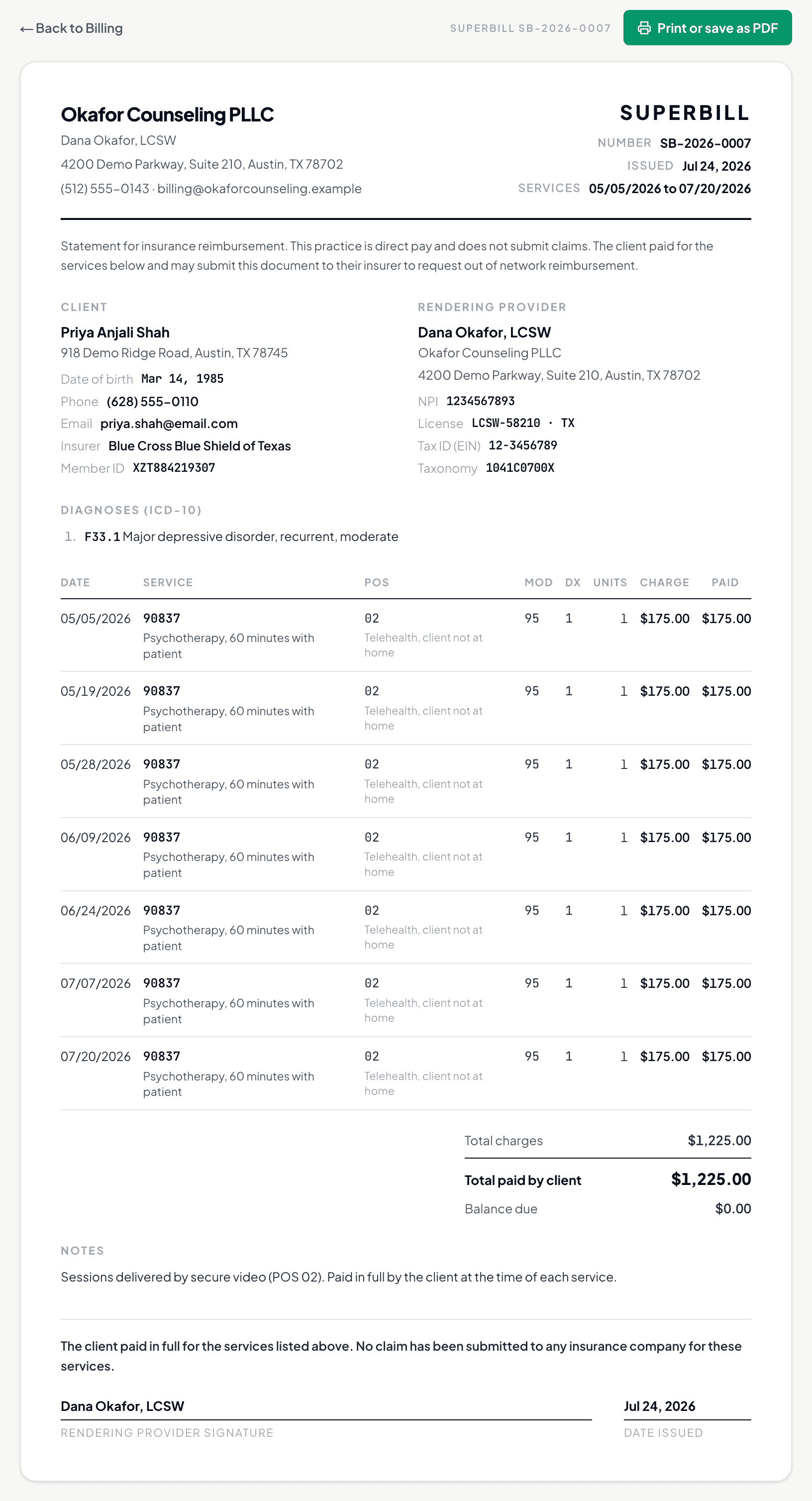
Built for direct-pay practice, so there is no clearinghouse, no claim queue, and nothing to chase. The parts we left out are the parts that cost money to run.
No, and that is deliberate. There is no clearinghouse, no claim submission, no eligibility check, and no denial queue. FeelCharts is built for clinicians who took their practice direct pay. If you bill insurance, you want a different tool and we will say so.
No. Start free, bring your clients over, and only pay when you are ready. Cancel anytime.
Yes. Every record is encrypted in transit and at rest, and fenced to your account by a database-level policy, so no other clinician can reach your chart. We do not sell data, run ad trackers, or share your client list with anyone.
No. AI is optional. For every note you choose: type it, dictate it on your own device, or let AI draft it from the session. If you use the AI draft, you review, edit, and approve it, and nothing is filed until you say so. Elsewhere, AI drafts admin work like letters and chart summaries, always for you to check.
A session is recorded only when you choose the AI draft for that note, after you confirm your client agreed. The audio is sent to Google's Vertex AI, covered by a Business Associate Agreement, to draft the note, then deleted. Short recordings are never written to disk at all, and longer ones are removed from storage as soon as the draft comes back. We do not keep a library of your sessions.
No. The AI draft goes straight from the recording to a draft note, so no transcript of the session is made, and none is stored. What stays in the chart is the note you signed. Dictation is different: it transcribes your own voice inside your browser, and that text is your note.
Yes. Connect drChrono and your charts come across: clients, medications, allergies, problems, notes and documents. IntakeQ and Healthie bring your client list. A large practice can take several hours to move, so keep your current system running alongside and switch when you are ready.
Yes, as an optional add-on. A dedicated HIPAA-compliant fax number for your practice is $15 a month with 100 pages included, then 15¢ a page, sent or received. Send from any chart and file incoming faxes to a client. If you already have a fax service you like, keep it; nothing else in FeelCharts depends on it. We issue new numbers and do not port existing ones.
Yes, any time, in one click, from inside the app. You get every client, note, medication, invoice, message, and uploaded document as one archive: readable chart files for you, JSON and CSV for whatever system comes next. No ticket, no waiting period, no fee. It is your data, and the export is how we prove it.
Start free, connect your current system, and keep it running until you are ready to close it.
No card required.
Looking for a supervision management platform?
FeelSuper tracks supervisee hours, approvals, and licensure progress — and it connects to FeelCharts, so a supervisee's signed notes report their hours automatically.